





Best Phones for Seniors 2026: Simple, Big-Screen Picks That Just Work
The best phone for a senior is rarely the most powerful one. It is the one with a screen you can read without glasses, buttons and menus that make sense the first time, a battery that does not need charging by dinner, and a way to call for help fast when something goes wrong.
This guide picks the best phones for seniors in 2026 across the range: three full smartphones for seniors who want the real thing with the difficulty turned down, and one simple flip phone for anyone who just wants to make calls.
What makes a phone senior-friendly
Start with the screen. A big, bright display with large text matters more than any processor. Look for 6.7 inches or more, and a phone that lets you raise the font size system-wide without breaking apps.
Next is sound. Loud speakers and clear call audio matter for hearing, and hearing-aid compatibility is worth checking before you buy. A phone that works well with hearing aids saves more frustration than any other feature.
Then simplicity. The best senior phones have a simplified home screen mode that shows a few large icons instead of a grid of apps. Samsung calls it Easy Mode. Apple does it with larger text, reduced motion and a stripped-back layout.
Battery life is the quiet requirement. A phone that lasts two days removes the daily charging chore and the anxiety of a dead phone. And safety features seal the deal: fall detection, emergency SOS, and the ability to share a location with family.
1. iPhone 18 Pro Max: the simplest powerful phone
The iPhone 18 Pro Max is the easiest flagship to hand to a senior who wants a proper smartphone. Its 6.9-inch Super Retina display is the biggest on any iPhone, and Apple’s accessibility settings are the best in the business: larger text that applies everywhere, VoiceOver, hearing-aid support, and a setup process a family member can walk through in minutes.
It costs $1,299, so it is not a budget pick. What the money buys is longevity: years of software updates, a 5,391mAh battery, and cameras that take a good photo without any fiddling. Face ID replaces passwords for most things, and Emergency SOS plus fall detection come standard. For a senior already in the Apple world, or with family on iPhones, this is the straightforward choice.
2. Samsung Galaxy S26 Ultra: the best big-screen Android
The Galaxy S26 Ultra, at $1,299.99, is the Android answer to the same brief. Its 6.9-inch Dynamic AMOLED display is bright and sharp, and Samsung’s Easy Mode turns the home screen into a handful of large icons with bigger text and a simpler layout. Turning it on takes seconds in Settings.
The S26 Ultra adds a 5,000mAh battery and a loud speaker setup, plus Samsung’s accessibility suite, which covers hearing enhancements, high-contrast text and a simplified keyboard. It is also the better pick for a senior who already uses a Samsung tablet or watch, since the devices share the same account and settings.
3. Google Pixel 11 Pro XL: the cleanest Android
The Pixel 11 Pro XL costs $1,299 and runs the cleanest version of Android there is. There is no duplicate app store, no extra skin to learn, and no bloatware to confuse things. Google’s call screening answers unknown numbers and transcribes the caller’s message, which is genuinely useful for blocking the spam calls that target older people.
Its 6.8-inch LTPO display adjusts from 1Hz to 120Hz, so it sips battery when nothing moves, and the 5,115mAh battery easily covers a full day. The cameras are point-and-shoot simple and excellent in low light. For a senior who wants Android without the clutter, this is the one.
4. Nokia 2360 Flip: for calls, not apps
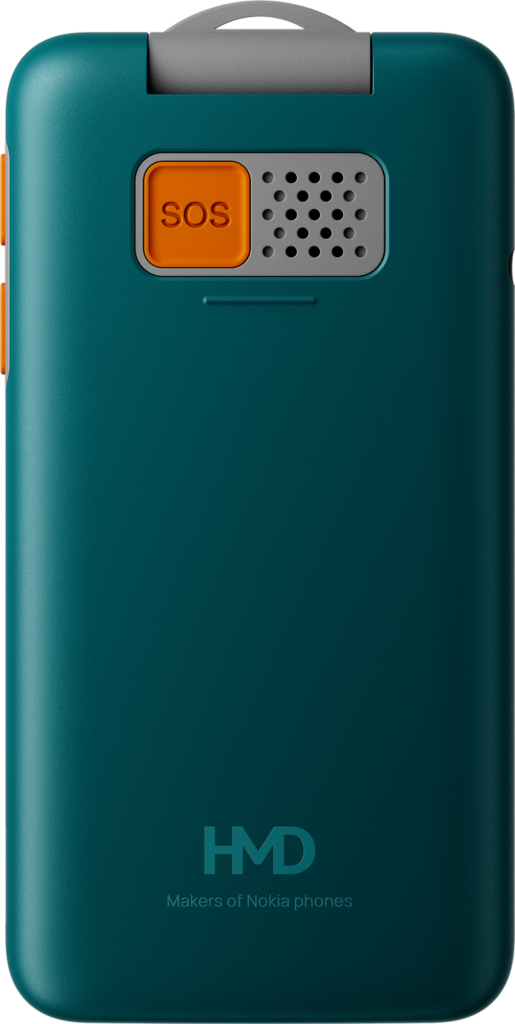
Some seniors do not want a smartphone at all, and the Nokia 2360 Flip is the honest answer for them. It is a flip phone with real buttons, a 2.8-inch main display and a small 1.77-inch outer screen that shows who is calling. There are no apps to update, no passwords to forget, and no accidental taps that open something strange.
The battery is the real selling point. The removable 1,450mAh cell gives up to 15 days of standby and up to 27.5 hours of talk time, so charging becomes a weekly job instead of a daily one. It costs a fraction of any smartphone on this list, and for a parent or grandparent who only wants to call and be called, it is the kindest gift you can buy.
Setting up a senior-friendly phone
Whichever phone you choose, spend twenty minutes on setup. Turn on larger text and display zoom, switch on Easy Mode on Samsung or reduce motion and transparency on iPhone, add emergency contacts and medical information, and turn on fall detection where it is offered. Put the phone app, messages and contacts on the home screen and remove everything else. Then write the unlock code on a card kept at home, not on the phone.
What to avoid
Skip phones with small screens, dim displays or heavy manufacturer skins that bury settings three menus deep. Avoid the cheapest no-name phones: their screens are hard to read in sunlight, their speakers are quiet, and their software updates stop quickly. And do not buy a phone with a battery under 4,500mAh for a senior; the charging chore alone is reason enough to spend a little more.
FAQ
What is the best phone for an elderly person in 2026?
The iPhone 18 Pro Max is the best all-round pick for its accessibility and simplicity, while the Nokia 2360 Flip is best for anyone who only wants calls and texts.
Is a flip phone better than a smartphone for seniors?
It depends on the person. A flip phone is better for calls only, with weeks of battery and no learning curve. A smartphone is better if they want video calls with family, photos and maps.
What is Samsung Easy Mode?
Easy Mode is a Samsung setting that replaces the home screen with large icons, bigger text and a simpler layout. It can be switched on in Settings on the Galaxy S26 Ultra.
How much should I spend on a senior phone?
A flip phone costs a fraction of a smartphone. For a full smartphone, the best senior-friendly models start around $1,299, but older flagships and mid-range phones with big screens can work well for less.
Sources: Cellular Heros catalog (cellularheros.us)